
Quick answer: Put AND or OR inside the first part of IF.
- All conditions must be true:
=IF(AND(B2>=100,C2="Yes"),"Bonus","No") - Any one condition is enough:
=IF(OR(D2="East",D2="West"),"Priority","Standard") - Both together:
=IF(AND(C2="Yes",OR(D2="East",D2="North")),"Yes","")
AND and OR always go in front of the conditions, with the conditions inside the brackets, separated by commas.
Tested in Excel for Microsoft 365 on Windows 11, November 2026. All results below are from that test sheet.
The sample data
Five salespeople with Sales, Training (Yes/No) and Region. Each column E to K holds one formula, copied down.
IF with AND: all conditions must be true
Give a bonus only if sales are at least 100 and training is done:
=IF(AND(B2>=100,C2="Yes"),"Bonus","No")
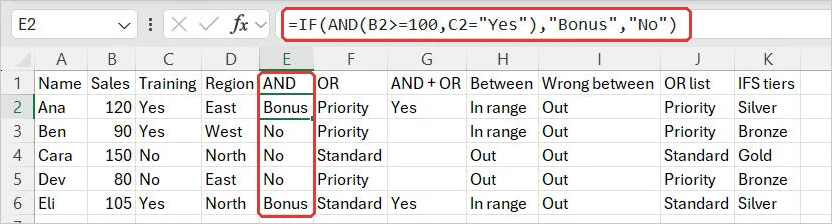
Ana (120, Yes) and Eli (105, Yes) get Bonus. Cara has 150 sales but no training, so she gets No.
IF with OR: any condition is enough
Mark East or West customers as priority:
=IF(OR(D2="East",D2="West"),"Priority","Standard")
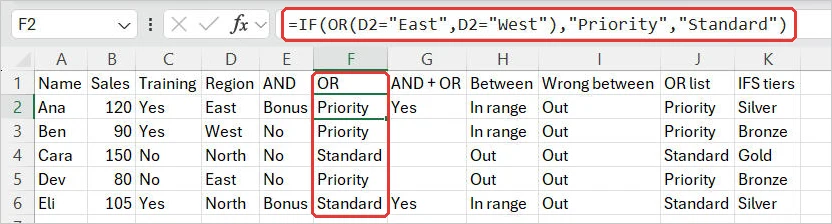
Text tests like D2="East" are not case-sensitive, so “east” also matches.
IF with AND and OR together
Trained staff in East or North only:
=IF(AND(C2="Yes",OR(D2="East",D2="North")),"Yes","")
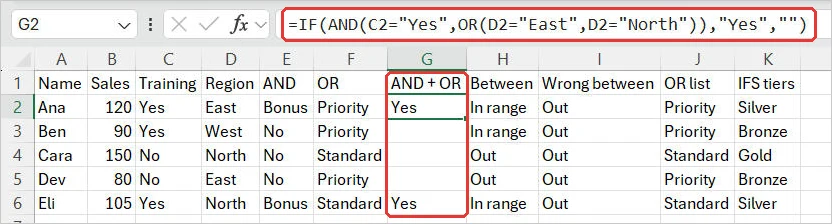
Read it from the inside out: OR checks the region, then AND checks that both training and region pass. The "" at the end leaves the cell blank when the test fails.
IF between two values
To check whether sales are between 90 and 120 (inclusive):
=IF(AND(B2>=90,B2<=120),"In range","Out")
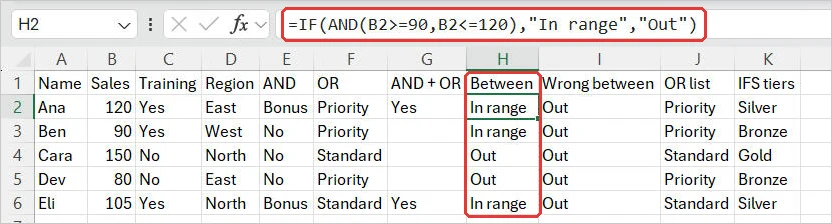
Use > and < instead if 90 and 120 themselves should not count.
The “between” mistake most people make
This looks right, but it is wrong:
=IF(90<=B2<=120,"In range","Out")
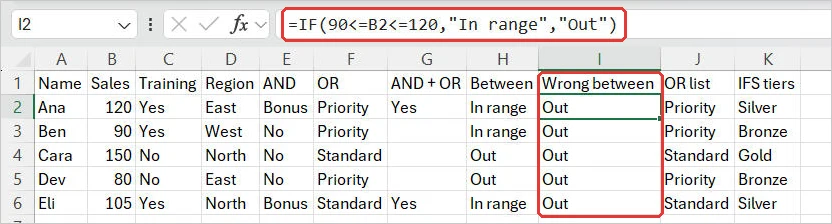
In our test it returned Out for every row, even for 90 and 120. Excel doesn’t read it as maths does. It works out 90<=B2 first (TRUE or FALSE), then compares that TRUE or FALSE with 120. Excel ranks TRUE and FALSE above any number, so the second test is always FALSE. Excel gives no error, which makes this mistake easy to miss. Always use AND.
Shortcut: OR with a list of values
Instead of repeating D2= for every value, give OR a list in curly brackets:
=IF(OR(D2={"East","West"}),"Priority","Standard")
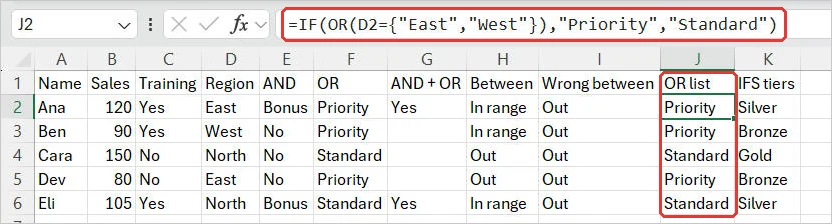
It gave exactly the same results as the longer OR formula. Add more values inside the braces: {"East","West","South"}.
More than two outcomes: IFS
AND and OR give two outcomes (true or false). For tiers, use IFS, which stops at the first test that is true:
=IFS(B2>=150,"Gold",B2>=100,"Silver",TRUE,"Bronze")
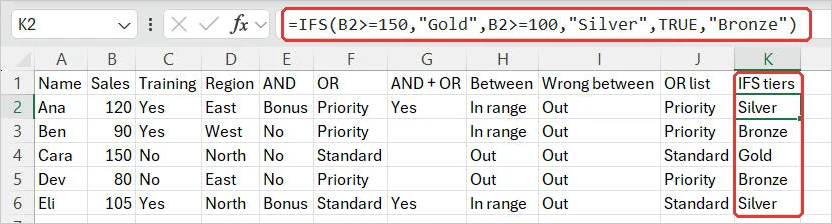
- Put the highest limit first, or everyone above 100 becomes Silver.
TRUEas the last test means “everything else”.- IFS is in Excel 2019 and Microsoft 365. In older versions, nest IFs:
=IF(B2>=150,"Gold",IF(B2>=100,"Silver","Bronze")).
You can also put AND or OR inside any IFS test, for example IFS(AND(B2>=100,C2="Yes"),"Bonus",TRUE,"No").
AND, OR and NOT at a glance
| Function | Returns TRUE when | Example |
|---|---|---|
| AND | Every condition is true | AND(B2>=100,C2="Yes") |
| OR | At least one condition is true | OR(D2="East",D2="West") |
| NOT | The condition is false | NOT(C2="Yes"), same as C2<>"Yes" |
AND and OR each accept up to 255 conditions.
Common mistakes
| Mistake | Fix |
|---|---|
=IF(B2>=100 AND C2="Yes",…) | AND goes in front: IF(AND(B2>=100,C2="Yes"),…) |
=IF(90<=B2<=120,…) | Use AND(B2>=90,B2<=120) |
Text without quotes, e.g. C2=Yes | Text needs quotes: C2="Yes" (you’ll see #NAME?) |
| Numbers stored as text | "100" is not 100. Remove the quotes around numbers |
| IFS tiers in the wrong order | Start with the highest limit |
FAQ
How do I use IF with AND in Excel?
=IF(AND(condition1,condition2),value_if_true,value_if_false). Example: =IF(AND(B2>=100,C2=”Yes”),”Bonus”,”No”).
How do I use IF with OR in Excel?
=IF(OR(condition1,condition2),value_if_true,value_if_false). Example: =IF(OR(D2=”East”,D2=”West”),”Priority”,”Standard”).
Can I use AND and OR in the same IF formula?
Yes. Nest one inside the other, for example =IF(AND(C2=”Yes”,OR(D2=”East”,D2=”North”)),”Yes”,””).
How do I write an IF formula for a value between two numbers?
=IF(AND(B2>=90,B2<=120),”In range”,”Out”). Don’t write 90<=B2<=120; Excel returns the wrong answer without an error.
How do I write an IF formula with 3 conditions?
Add a third condition inside AND or OR, such as AND(B2>=100,C2=”Yes”,D2=”East”). For 3 different results, use IFS or nested IFs.
Is the IF function case-sensitive?
No. “yes” and “Yes” match. Use EXACT inside the test if you need a case-sensitive match.
Related tutorials
- How to Check If an Excel Cell Is Blank: ISBLANK vs IF
- Show Blank Instead of Zero When a Referenced Cell Is Empty
- How to Count Non-Blank Cells in Excel (COUNTA vs COUNTIF)
- How to Create a Drop-Down List in Excel
