Quick answer: Python’s array.array stores a resizable sequence of values represented by one type code. Use it for compact, homogeneous primitive values; use a list for general-purpose Python objects, or a NumPy array for vectorized numerical calculations. Below are runnable examples of indexing, inserting, deleting, and extending arrays.
What Is an Array in Python?
The standard-library array module provides typed arrays. Elements are accessed by zero-based indexes: for five elements, the valid positive indexes are 0 through 4, and -1 refers to the last element. Unlike fixed-length arrays in some languages, array.array can grow or shrink.
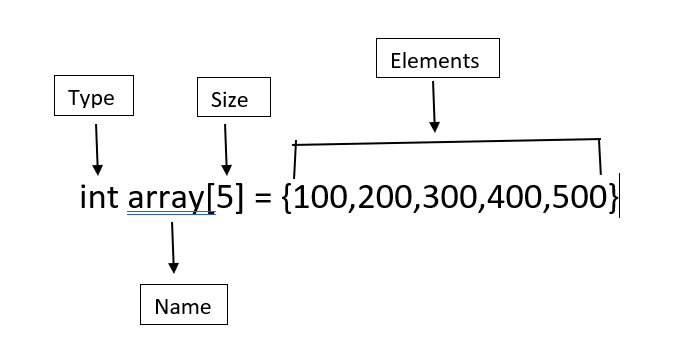
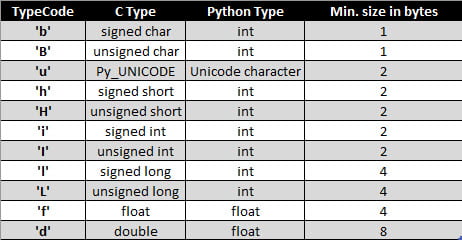
The illustration shows five positions. It is an example of the current number of elements, not a permanent capacity limit. Type codes such as 'i' (signed integer) and 'd' (double-precision floating point) determine the storage representation; exact integer ranges can depend on the platform.
Create and Read an Array
from array import array

numbers = array('i', [10, 50, 60, 80, 40])
print(numbers)       # array('i', [10, 50, 60, 80, 40])
print(numbers[2])    # 60
print(numbers[-1])   # 40
print(len(numbers))  # 5
Importing array by name avoids from array import *. Indexing outside the available range raises IndexError. len() is a built-in function, not an array-specific method.
Update, Append, Insert and Remove Elements
from array import array

numbers = array('i', [10, 50, 60, 80, 40])
numbers[1] = 25
print(numbers)  # array('i', [10, 25, 60, 80, 40])

numbers.append(35)
print(numbers)  # array('i', [10, 25, 60, 80, 40, 35])

numbers.insert(2, 90)
print(numbers)  # array('i', [10, 25, 90, 60, 80, 40, 35])

removed = numbers.pop(4)
print(removed)  # 80
print(numbers)  # array('i', [10, 25, 90, 60, 40, 35])
append() adds one value at the end; insert(index, value) inserts before the specified position; pop(index) removes and returns a value. Without an argument, pop() removes the final element. Insertions and removals may shift later elements.
Extend an Array with Multiple Values
from array import array

left = array('i', [10, 50, 60])
right = array('i', [100, 900])
left.extend(right)
print(left)  # array('i', [10, 50, 60, 100, 900])
When extending from another array.array, use a compatible type code. An array can also be extended with an iterable of values that fit its element type.
Python array.array vs list vs NumPy
List: accepts references to objects of different types and is usually the easiest choice for everyday Python code. array.array: holds a homogeneous primitive representation and can use less memory for large numeric sequences, although actual memory use depends on values and implementation. NumPy ndarray: supports multidimensional arrays and efficient vectorized operations but requires installing NumPy. For lists, see how to create a Python list.
Check Storage Size and Convert Safely
Use itemsize to inspect bytes per stored element on your machine, and buffer_info() only when low-level memory interoperability is required. array.array does not automatically validate whether a conversion preserves floating-point precision; choose a type code appropriate to the data. To convert to an ordinary list, call tolist().
from array import array

values = array('d', [1.5, 2.5, 3.5])
print(values.itemsize)  # Typically 8 bytes for type code 'd'
print(values.tolist())  # [1.5, 2.5, 3.5]
print(len(values) * values.itemsize)  # Bytes used by the element buffer
The buffer calculation excludes Python object overhead. For numeric operations, prefer NumPy when vectorization is important; for ordinary collections of arbitrary objects, prefer a list.
Common Errors and Troubleshooting
TypeError: appending an incompatible value (such as a string to an integer array) fails. OverflowError: an integer outside the type code’s supported range cannot be stored. IndexError: reading or popping an unavailable index fails. If your goal is numerical analysis, do not assume array.array supports NumPy-style elementwise arithmetic.
Frequently Asked Questions
Are Python arrays fixed-size? No. The standard-library array.array supports append(), extend(), insert() and pop().
Do arrays start at index 0? Yes. The first element is at index 0; the last can be read with -1.
Which type code should I use? Choose a code appropriate to your values and portability needs. Refer to the official type-code table; do not assume identical C integer widths on every system.
Can I mix strings and numbers? Not in a typed numeric array.array. Use a Python list for mixed Python objects.

C P Gupta is a YouTuber and Blogger. He is expert in Microsoft Word, Excel and PowerPoint. His YouTube channel @pickupbrain is very popular and has crossed 9.9 Million Views.