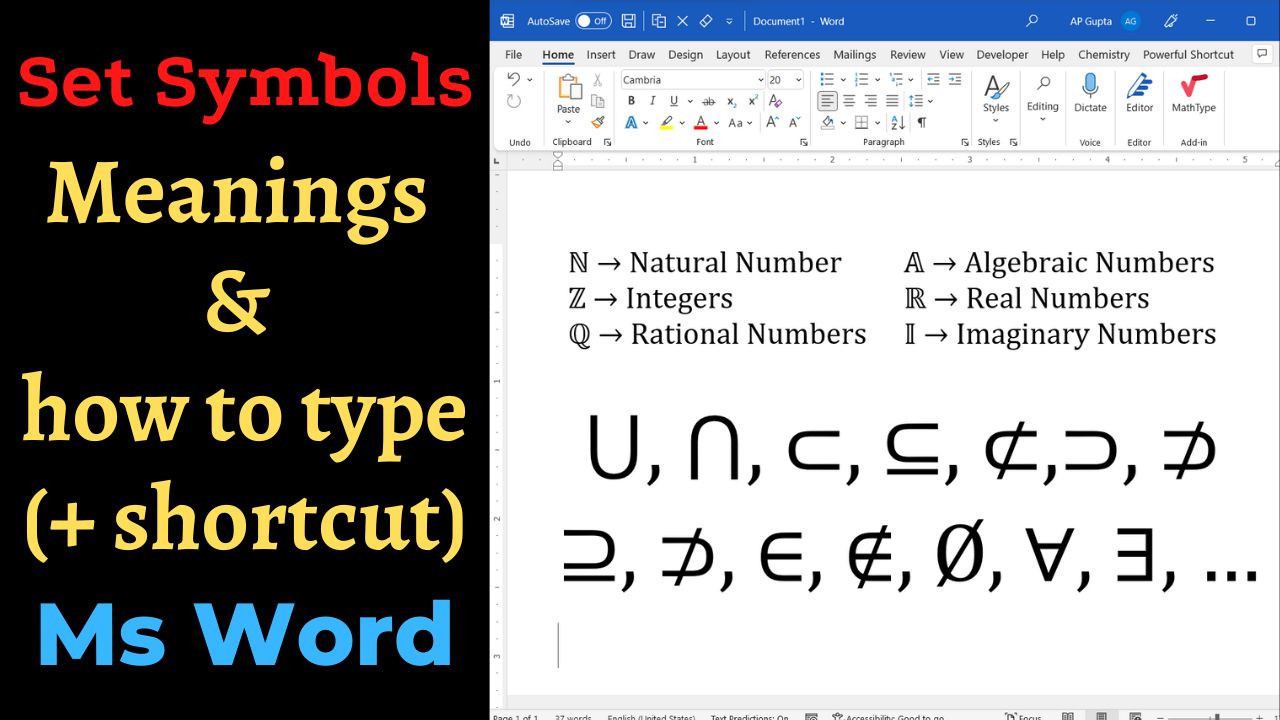
Common set-theory symbols include ∈ (element of), ∉ (not an element of), ⊂ (proper subset in many conventions), ⊆ (subset or equal), ∪ (union), ∩ (intersection), ∅ (empty set) and ℝ (real numbers). In Word, insert them using Insert > Symbol or the equation editor. Symbols can have convention-dependent meanings, so define ambiguous notation.
These set symbols represent mathematical relationships concisely. The reference table below explains common notation and gives Unicode codes for inserting symbols in desktop Microsoft Word for Windows.
Set theory symbols: meanings, examples and Word shortcuts
Three ways to insert set symbols in Microsoft Word
Insert Symbol Method: On desktop Word, choose Insert > Symbol > More Symbols, choose a suitable font, then select the character and click Insert. The table below lists a Unicode value for each applicable symbol; the Symbol dialog’s Subset dropdown can help locate it, although the available categories depend on the font.
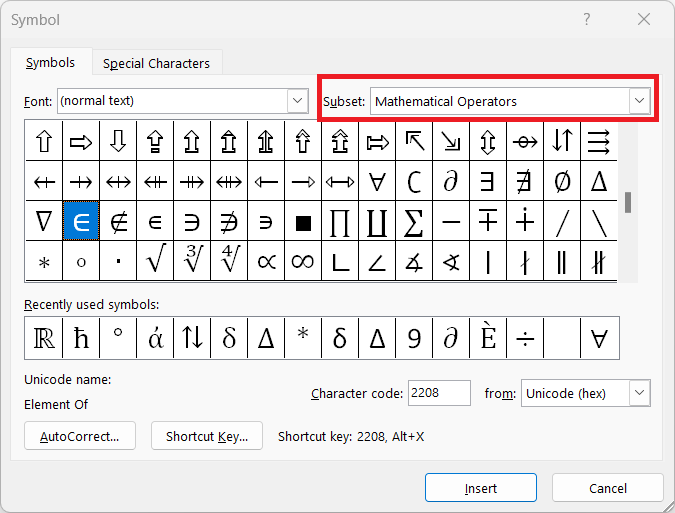
Math AutoCorrect: Inside a Word equation, enter a supported Math AutoCorrect command (for example, \in) and press Space to convert it. The exact command and conversion behavior depend on the equation input mode and Word edition. On Windows desktop, you can optionally enable supported Math AutoCorrect rules outside equations:
- Go to File > Options to open Word Options
- In Proofing and select AutoCorrect Options
- In Math Autocorrect tab, check box against “Use Math AutoCorrect rules outside of math regions”
Unicode Alt+X (Windows desktop): Type the hexadecimal Unicode value, then press Alt+X immediately after it. For example, 2208 followed by Alt+X becomes ∈. This is not a universal shortcut for Word on Mac or the web.
Let’s say, P = {1, 2, 3, 4} and Q = {1, 3, 5}
| Symbol | Name & Meaning | Example | Subset of Symbol | Math Autocorrect Shortcut (press space after shortcut to get symbol) | Alt X Code (type this code and press Alt+X) |
|---|---|---|---|---|---|
| ℕ | Natural numbers: commonly {1, 2, 3, …}; some conventions include 0 | ℕ = {1, 2, 3, …} | letterlike symbols | \doubleN | 2115 |
| ℤ | Integers: A whole number (not fractional ) that are +ve, -ve or 0 | ℤ = {…, -2, -1,0 ,1 ,2 ,…} | letterlike symbols | \doubleZ | 2124 |
| ℚ | Rational Numbers: a number that is of the form p/q where p and q are integers and q is not equal to 0 | 5, 10.45, 3/7 | letterlike symbols | \doubleQ | 211A |
| 𝔸 | Algebraic numbers: Number that is the solution to a polynomial with rational coefficients | 1, 3/7, √2 | Extended characters – Plane 1 | \doubleA | 1D538 |
| ℝ | Real numbers: A number that includes rational and irrational numbers | 2, π, 2/7 | letterlike symbols | \doubleR | 211D |
| 𝕀 | Pure imaginary numbers: real multiples of the imaginary unit i, where i2 = −1. The double-struck 𝕀 is not a universally standard symbol for this set | 5i, πi | Extended characters – Plane 1 | \doubleI | 1D540 |
| ℂ | Complex number: a number of the form a + bi, where a and b are real numbers | 2+3i, 1.5-1i | letterlike symbols | \doubleC | 2102 |
| { } | Set: collection of elements | Q = {1, 3, 5} | – | – | – |
| A ∪ B | Union: in A or B (or both) | P ∪ Q = {1, 2, 3, 4, 5} | Mathematical operators | \bigcup | 222A |
| A ∩ B | Intersection: elements belonging to both A and B | P ∩ Q = {1, 3} | Mathematical operators | \bigcap | 2229 |
| A ⊆ B | Subset: every element of A is in B | {1, 3, 5} ⊆ Q or {2, 4} ⊆ P | Mathematical operators | \subseteq | 2286 |
| A ⊂ B | Proper Subset: every element of A is in B, but B has more elements. | Correct: {1, 3} ⊂ Q Incorrect: {1, 3, 5} ⊂ Q | Mathematical operators | \subset | 2282 |
| A ⊄ B | Not a Subset: A is not a subset of B | {5, 6} ⊄ Q (because 6 ∉ Q) | Mathematical Operators | 2284 | |
| A ⊇ B | Superset: A has same elements as B, or more | {1, 3, 5, 7} ⊇ {1, 3, 7} or {1, 3, 5, 7} ⊇ {1, 3, 5, 7} | Mathematical operators | \superseteq | 2287 |
| A ⊃ B | Proper Superset: A has B’s elements and more | Correct: {1, 3, 5, 7} ⊃ {3, 5, 7} Incorrect: {1, 3, 5, 7} ⊃ {1, 3, 5, 7} | Mathematical operators | \superset | 2283 |
| A ⊅ B | Not a Superset: A is not a superset of B | {1, 3, 5, 7} ⊅ {1, 9} | 2285 | ||
| Ac | Complement: Elements not in A | If U = {1, 2, 3, 4, 5, 6, 7}, then Qc = {2, 4, 6, 7} | – | – | – |
| A − B | Difference: In A but not in B | Let X = {1, 2, 3, 4} and Y = {2, 4}, then X – Y = {1, 3} | – | – | – |
| a ∈ A | Element: a is an element of A | 3 ∈ {1, 2, 3, 4} | Mathematical operator | \in | 2208 |
| b ∉ C | Not an element: b is not an element of C | 2 ∉ {1, 3, 5} | Mathematical operator | \notelement | 2209 |
| ∅ | Empty set: a set with no elements, also written { } | {1, 3} ∩ {2, 4} = ∅ | Mathematical operator | \emptyset | 2205 |
| 𝕌 | Universal set: the specified domain of discourse; the symbol 𝕌 is optional and not universal across textbooks | If U = {1, 2, 3}, then the complement of {1} is {2, 3} | Extended Characters – Plane 1 | \doubleU | 1D54C |
| P(A) | Power set: the set of all subsets of A, including ∅ and A itself | P({a, b}) = { {}, {a}, {b}, {a, b} } | – | – | – |
| A = B | Equality: both sets have the same members | {2, 5, 8} = {8, 2, 5} | – | – | – |
| A×B | Cartesian Product: (set of ordered pairs from A and B) | {1, 2} × {a, b} = {(1, a), (1, b), (2, a), (2, b)} | Latin-1 Supplement | \times | 00D7 |
| |A| | Cardinality: number of elements of set A | |{5, 6}| = 2 | – | – | |
| | | Such that | { n ∈ ℕ | n > 0 } = {1, 2, 3,…}, using ℕ = {1, 2, 3, …} | – | – | – |
| : | Such that | { n ∈ ℕ : n > 0 } = {1, 2, 3,…}, using positive naturals | – | – | – |
| ∀ | For all | ∀ x >1, x2 > x (for all x greater than 1, x square is greater than x) | Mathematical operators | \forall | 2200 |
| ∃ | There exists | ∃ x | x2 < x (there exists x such that x squared is less than x) | Mathematical operators | \exists | 2203 |
| ∄ | There does not exist | ∄ x | x +1 < x | Mathematical operator | 2204 | |
| ∴ | Therefore | a=b ∴ b=a | Mathematical operators | \therefore | 2234 |
Set notation examples
If A = {1, 2} and B = {2, 3}, then A ∪ B = {1, 2, 3} and A ∩ B = {2}. The statement 2 ∈ A is true, while 3 ∉ A is true. Use ∅ for the empty set, not the letter O or the numeral zero.
Subset symbols require care
Some textbooks use ⊂ for a strict subset, while others use it for a non-strict subset. The symbol ⊆ explicitly allows equality, and ⊊ expresses a proper subset without ambiguity. When writing for students, specify the convention you use.
Word insertion and formatting
In desktop Word for Windows, a hexadecimal Unicode value followed by Alt+X can insert many symbols; for example, 2208 then Alt+X produces ∈ and 2205 produces ∅. If conversion fails, select the code first or use Insert > Symbol > More Symbols. In equations, Math AutoCorrect support depends on the active input mode.
Important distinctions: ∅, Ø and subset notation
The empty-set symbol is ∅ (Unicode U+2205), not the Latin letter O, zero, or the visually similar slashed letter Ø (U+00D8). In Word for Windows, type 2205 and press Alt+X to insert ∅. The meaning of ⊂ differs across textbooks; use ⊊ when you need an unambiguous proper-subset sign and explain the convention in your document.
Accessibility, equations and troubleshooting
When presenting set notation in a document, explain unfamiliar symbols in nearby text so readers are not required to infer meaning from a dense table. Word’s Alt+X conversion is primarily a desktop Windows feature; on Mac or Word for the web, use Insert > Symbol where available or insert the Unicode character directly. Equation-editor shortcuts can vary with the equation input mode, and the table’s Math AutoCorrect entries are not guaranteed to work as literal LaTeX commands in every mode.

C P Gupta is a YouTuber and Blogger. He is expert in Microsoft Word, Excel and PowerPoint. His YouTube channel @pickupbrain is very popular and has crossed 9.9 Million Views.
Pingback: How to Insert the Intersection Symbol in Word?