A Python list comprehension builds a new list by evaluating an expression for each item in an iterable, optionally filtering items with an if condition. It is useful for readable transformations, but not every loop should be compressed into one line.
What is List Comprehension?
List comprehension creates a new list from any iterable, including a list, tuple, string or generator. You can transform each item and optionally filter items with a condition. For straightforward transformations, it can be clearer than a multi-line loop.
Let’s see an example where you want to create a list containing a square of numbers from 1 to 10.
square = [] # empty list for storing square of number
for i in range(1, 11):
    square.append(i*i)
A list comprehension expresses the same transformation in one line:
square = [ i*i for i in range(1,11)]
The above code is just the tip of an iceberg. You can do a lot more using list comprehension.
Why use list comprehension in Python
- Concise: Multiple line of code can be replaced with one liner list comprehension
- Performance: Comprehensions can reduce Python-level loop overhead for simple transformations, but benchmark your actual workload rather than assuming a universal speedup.
- Readability: Improves overall readability of code
Syntax
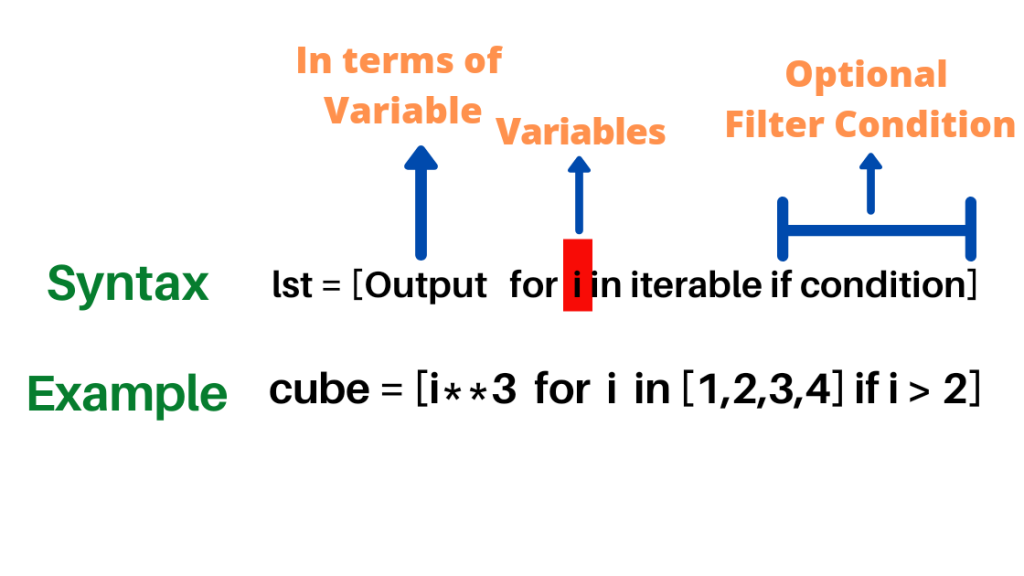
#Above Example is equivalent to
cube = []
for i in [1, 2, 3, 4]:
    if i > 2:
        cube.append(i**3)
# cube == [27, 64]
In the example,
- Output: It is the value that is stored in the list. It is an expression, or function of variable used in for loop. The variable of each iteration can be manipulated if required in the output.
- Variable: For loop iterates through each item of list/sequence and stores it in variable.
- Condition (Optional): Although optional, you can filter the outcome of for loop using condition. Variable that satisfies the condition is only available for output.
Manipulating output of list expression:
Following code generates a list of number from 1 to N. This is the base case that we will build upon and add complexity
N = 5
numbers = [i for i in range(1, N+1)] # Example of simple list comprehension
print(numbers)
# Output
# [1, 2, 3, 4, 5]

#  Above code is equivalent to
N = 5
numbers = []
for i in range(1, N+1):
    numbers.append(i)
print(numbers)
# Output
# [1, 2, 3, 4, 5]
To get a list of square, just replace i in output with i*i
N = 5
numbers = [i*i for i in range(1, N+1)] # Example of simple list comprehension
print(numbers)
# Output >>> [1, 4, 9, 16, 25]

#  Above code is equivalent to
N = 5
numbers = []
for i in range(1, N+1):
    numbers.append(i*i)
print(numbers)
# Output >>> [1, 4, 9, 16, 25]
Instead of manipulating variable in output, any functions or expression can be used. In the following example shows how to use function.
N = 5
def f(x):
    return (x*x + 2*x + 1)
numbers = [f(i) for i in range(1, N+1)]
print(numbers)
# Output >>> [4, 9, 16, 25, 36]

# Above code is equivalent to
N = 5
numbers = []
def f(x):
    return (x*x + 2*x + 1)
for i in range(1, N+1):
    numbers.append(f(i))
print(numbers)
# Output >>> [4, 9, 16, 25, 36]
Creating Nested list with Multiple output: Returning multiple output as a list or tuple is also possible with list comprehension. This is very useful for creating function values for a range of input.
N = 3
def f(x):
    return (x*x + 2*x + 1)
numbers = [[x,f(x)] for x in range(1, N+1)]
print(numbers)
# Output >>> [[1, 4], [2, 9], [3, 16]]

# Above code is equivalent to
N = 3
numbers = []
def f(x):
    return (x*x + 2*x + 1)
for x in range(1, N+1):
    numbers.append([x, f(x)])
print(numbers)
# Output >>> [[1, 4], [2, 9], [3, 16]]
Iterating over sequence
Next, in list comprehension, you can iterate over any sequence or iterable like list, generator, dictionary, tuple or string.
Example: iterate over a list of number words and convert each string to uppercase.
numbers = ['One', 'Two', 'Three', 'Four', 'Five']
uppercase_numbers = [num.upper() for num in numbers]
print(uppercase_numbers)
# Output >>> ['ONE', 'TWO', 'THREE', 'FOUR', 'FIVE']
Iterating over dictionary values (in insertion order in Python 3.7+):
countries = {'India': 'New Delhi', 'US': 'Washington DC', 'UK': 'London'}
capital = [countries[key] for key in countries]
print(capital)
# Output >>> ['New Delhi', 'Washington DC', 'London']
Nested Loop in List Comprehension
Till now we have used only one for loop. However, it is possible to use nested for loop too in list expression. In the following example, the first for loop extracts the rows of nested list, while the second for loop extracts numbers from each row which is being stored in the list.
vec = [[1,2,3], [4,5,6], [7,8,9]]
v = [num for row in vec for num in row]
print(v)
# Output >> [1, 2, 3, 4, 5, 6, 7, 8, 9]

# Above code is equivalent to
vec = [[1,2,3], [4,5,6], [7,8,9]]
v = []
for row in vec:
    for num in row:
        v.append(num)
print(v)
# Output >> [1, 2, 3, 4, 5, 6, 7, 8, 9]
Using if condition in list comprehension
Although optional, you can create a list of elements that follows particular condition. Following example filters out even numbers or a positive number from another list.
# Filter out Even numbers as list
sample1 = [2, 4, 7, 6, 9, 15, 20, 4, 7, 8]
even = [num for num in sample1 if num % 2 == 0]
print(even)
# Output >>> [2, 4, 6, 20, 4, 8]

# Filter out positive numbers from list
sample2 = [1, -2, 3, -8, -4, 5, 6, -8, -10, 2]
positive = [num for num in sample2 if num >=0]
print(positive)
# Output >>> [1, 3, 5, 6, 2]
Using if else condition in list comprehension
Use a conditional expression before the for clause to transform every element. This does not filter items; add a trailing if to filter. Following code show how it can create a list containing True if number is Even or False if number is not even based on numbers from another list.
# Example of if else condition in list comprehension in Python
numbers = [1,4,5,9,2]
is_even = [True if i % 2 == 0 else False for i in numbers]
print(is_even)
# Output >>> [False, True, False, False, True]
Remove duplicates while preserving order (use a loop)
Do not use a list comprehension only for its side effects. A straightforward loop is clearer for building a distinct-values list; for hashable values, list(dict.fromkeys(lst)) is another order-preserving option.
# Keep distinct values in first-seen order
lst = [1, 7, 3, 4, 1, 5, 6, 3, 0, 2]
unique = []
for num in lst:
    if num not in unique:
        unique.append(num)
print(unique)
# Output >>> [1, 7, 3, 4, 5, 6, 0, 2]
Summary
List comprehensions create a new list from an iterable such as a list, tuple, string, range or dictionary. Iterating over a dictionary yields its keys by default. Use a regular loop when you need side effects or multiple statements.
Key points to note about list comprehension are
- It is an elegant way to create lists based on existing lists.
- It is often concise for simple transformations, but performance depends on the operation and data; benchmark only when speed matters.
- Avoid deeply nested or complicated comprehensions that reduce readability.
- A comprehension can usually be expressed as a loop that builds a list, but loops that perform side effects or contain several statements should stay as loops.
Updated explanation and practical examples
The pattern is [expression for item in iterable if condition]. Example: squares = [n*n for n in range(1, 11)] produces squares from 1 through 10. Example: evens = [n for n in range(10) if n % 2 == 0] gives [0, 2, 4, 6, 8]. A conditional expression goes before the for clause: [‘even’ if n % 2 == 0 else ‘odd’ for n in range(4)]. Comprehensions produce a new list; generator expressions use parentheses and evaluate lazily.
Frequently asked questions
Q: Is a comprehension always faster? A: No; it often has lower overhead for simple transformations, but readability and the workload matter. Q: Should I use it for side effects? A: Prefer a regular for loop for printing, file writes or other side effects. Q: What happens to the loop variable? A: In modern Python 3, the comprehension variable has its own scope.
When to use a loop instead of a comprehension
Use a comprehension when its result is the list you want to keep. Prefer an ordinary loop for printing, logging, mutating external objects or performing several statements per item. For large streams, a generator expression can avoid materializing an entire intermediate list. If you need a set of unique hashable values, consider set(items) (unordered) or list(dict.fromkeys(items)) (preserves first-seen order).
Quick checks and troubleshooting
The filtered cubes example returns [27, 64]. The positive-number example returns [1, 3, 5, 6, 2]. If you see a TypeError, check that each item supports the operation in the expression; if you see a SyntaxError, check the position of if and else. An output such as [None, None] may indicate a side-effect function was called inside the comprehension instead of producing a useful value.
Related: Python iterables and iterators and Python map() examples.

C P Gupta is a YouTuber and Blogger. He is expert in Microsoft Word, Excel and PowerPoint. His YouTube channel @pickupbrain is very popular and has crossed 9.9 Million Views.